
2022年01月28日(金) [長年日記]
■ [c#] WPFのListViewに対するクリック処理を添付ビヘイビアで実装
WPFのListViewに対し、その項目をクリックしたときに何かをする処理はどう書くのか。
- 方法: ListView の各項目の MouseDoubleClick イベントを処理する (docs.microsoft.com)
にListViewItemへイベントハンドラを設定する例が書かれている。これだとViewのコードビハインドに処理を書くことになるが、コードビハインドを使いたくない場合もあるだろう。
ビヘイビア
コードビハインドを使わずにイベント処理などを行う方法として添付プロパティの仕組みを利用した「添付ビヘイビア」という手法がある。
また、添付ビヘイビアをライブラリ化して使いやすくしたものがBlendでSystem.Windows.Interactivityという名前空間で提供されていたが、現在ではそれがXamlBehaviors for WPFとしてMicrosoft.Xaml.Behaviors.Wpfという名前空間で提供されているようだ。このライブラリはNuGetから導入することができる。ドキュメントもあるがすべてが説明されているわけではなさそう。
ListViewのクリック処理を添付ビヘイビアで実装
XamlBehaviors for WPFを使うと少し短く書けるが、添付ビヘイビアの形で実装してもそれほど違いはなさそうなのでここでは添付ビヘイビアを使う例をメモする。
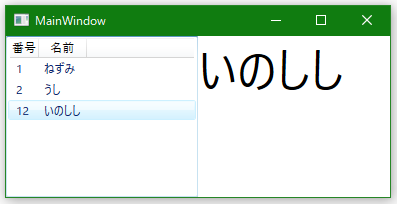
作るのは次のウィンドウだ。左側にあるListViewの項目をクリックすると、クリックした項目の名前が右側に表示される
XAMLは次のように書く。
<Window x:Class="WpfStudy.MainWindow"
        xmlns="http://schemas.microsoft.com/winfx/2006/xaml/presentation"
        xmlns:x="http://schemas.microsoft.com/winfx/2006/xaml"
        xmlns:d="http://schemas.microsoft.com/expression/blend/2008"
        xmlns:mc="http://schemas.openxmlformats.org/markup-compatibility/2006"
        xmlns:local="clr-namespace:WpfStudy"
        mc:Ignorable="d"
        Title="MainWindow" Height="200" Width="400">
    <Grid>
        <Grid.ColumnDefinitions>
            <ColumnDefinition Width="1*"/>
            <ColumnDefinition Width="1*"/>
        </Grid.ColumnDefinitions>

        <ListView Grid.Column="0" ItemsSource="{Binding Items}"
                  local:ListViewMouseBehavior.LeftDownCommand="{Binding SetMessageCommand}">
            <ListView.View>
                <GridView>
                    <GridViewColumn Header="番号" DisplayMemberBinding="{Binding Number}"/>
                    <GridViewColumn Header="名前" DisplayMemberBinding="{Binding Name}"/>
                </GridView>
            </ListView.View>
        </ListView>

        <TextBlock Grid.Column="1" Name="textBlock1" Text="{Binding Message}" FontSize="48"/>
    </Grid>
</Window>
- ListViewに「local:ListViewMouseBehavior.LeftDownCommand="{Binding SetMessageCommand}"」と添付プロパティを設定している。これがListViewがクリックされたときにコマンドを呼び出す添付ビヘイビアだ。
添付ビヘイビアは次のようになる。
using System.Windows;
using System.Windows.Controls;
using System.Windows.Input;
using System.Windows.Media;

namespace WpfStudy
{
    public static class ListViewMouseBehavior
    {
        // 本クラスが公開する添付プロパティ。
        // マウス左クリック時に実行するコマンドを保持する。
        // コマンドのパラメータにはクリックされたListViewItemのContextを設定している。
        public static readonly DependencyProperty LeftDownCommandProperty =
        DependencyProperty.RegisterAttached(
            "LeftDownCommand",
            typeof(ICommand),
            typeof(ListViewMouseBehavior),
            new PropertyMetadata(OnLeftDownCommandPropertyChanged));

        public static ICommand GetLeftDownCommand(ListView target) =>
            (ICommand)target.GetValue(LeftDownCommandProperty);

        public static void SetLeftDownCommand(ListView target, ICommand value) =>
            target.SetValue(LeftDownCommandProperty, value);

        // LeftDownCommandPropertyに対するPropertyChangedCallback。
        // 対象のListViewに対しマウス左クリック時のイベントハンドラを設定する。
        private static void OnLeftDownCommandPropertyChanged(
            DependencyObject d,
            DependencyPropertyChangedEventArgs e)
        {
            if (d is not UIElement ue) return;

            if (e.OldValue != null) ue.PreviewMouseLeftButtonDown -= ExecuteCommand;
            if (e.NewValue != null) ue.PreviewMouseLeftButtonDown += ExecuteCommand;
        }

        // ListViewに対するマウス左クリック時のイベントハンドラ。
        // プロパティに設定されているコマンドを実行する。
        private static void ExecuteCommand(object sender, MouseButtonEventArgs e)
        {
            if (sender is not ListView listView) return;
            if (e.OriginalSource is not DependencyObject source) return;

            var item = FindAncestor<ListViewItem>(source);
            if (item == null) return;

            var command = e.ChangedButton switch
            {
                MouseButton.Left => GetLeftDownCommand(listView),
                _ => null
            };
            if (command == null) return;

            var param = item.Content;
            if (command.CanExecute(param))
            {
                command.Execute(param);
                e.Handled = true;
            }
        }

        // Visual Treeをoから根の方に辿り、見つかったT型のオブジェクトを返す。
        private static T? FindAncestor<T>(DependencyObject o) where T : DependencyObject
        {
            if (o is T result) return result;

            var parent = VisualTreeHelper.GetParent(o);
            return parent == null ? null : FindAncestor<T>(parent);
        }
    }
}
- 以前書いたようにして添付プロパティを実装している。
- 添付プロパティのメタデータに指定するPropertyChangedCallbackにて、ListViewのPreviewMouseLeftButtonDownイベントにハンドラを設定している。このようにしてコードビハインド以外でイベント処理を実装する手法が添付ビヘイビアと呼ばれていると理解している。
- MouseLeftButtonDownではなくPreviewMouseLeftButtonDownイベントを使っているのは、MouseLeftButtonDownのハンドラが呼ばれなかったから。そういうこともあるとリファレンスのImportantの所に書かれている。
- クリックされた項目のデータを得るにはイベントハンドラにてListViewItemオブジェクトを取得する必要がある。MouseButtonEventArgsオブジェクトのOriginalSourceからビジュアルツリーを根の方に辿ってListViewItemオブジェクトを見つけるということをしている。
上のXAMLで定義したウィンドウのDataContextには次のクラスのインスタンスをセットした。Windows Community Toolkitに含まれるMVVM Toolkitを使っている。
using Microsoft.Toolkit.Mvvm.ComponentModel;
using Microsoft.Toolkit.Mvvm.Input;
using System.Collections.Generic;
using System.Windows.Input;

namespace WpfStudy
{
    class MainWindowModel : ObservableObject
    {
        public MainWindowModel()
        {
            Items = new List<Item>
            {
                new Item(1, "ねずみ"),
                new Item(2, "うし"),
                new Item(12, "いのしし"),
            };

            SetMessageCommand = new RelayCommand<Item>(x => Message = x?.Name ?? "");
        }

        public IEnumerable<Item> Items { get; }

        public string Message
        {
            get => _message;
            set => SetProperty(ref _message, value);
        }
        private string _message = "";

        public ICommand SetMessageCommand { get; }
    }
}
using System.Windows;

namespace WpfStudy
{
    /// <summary>
    /// Interaction logic for App.xaml
    /// </summary>
    public partial class App : Application
    {
        protected override void OnStartup(StartupEventArgs e)
        {
            base.OnStartup(e);

            var w = new MainWindow
            {
                DataContext = new MainWindowModel(),
            };
            w.Show();
        }
    }
}
[ツッコミを入れる]